






HestiaCP adalah control panel gratis dan open-source yang diperuntukan untuk sistem operasi berbasis Linux. Panel ini sepenuhnya gratis di bawah GNU General Public License v3 (GPL v3). Sehingga pengguna dapat bebas menggunakannya dan tidak perlu membeli lisensi untuk menggunakan HestiaCP. Panel ini dapat diinstall di OS berbasis Debian dan Ubuntu.
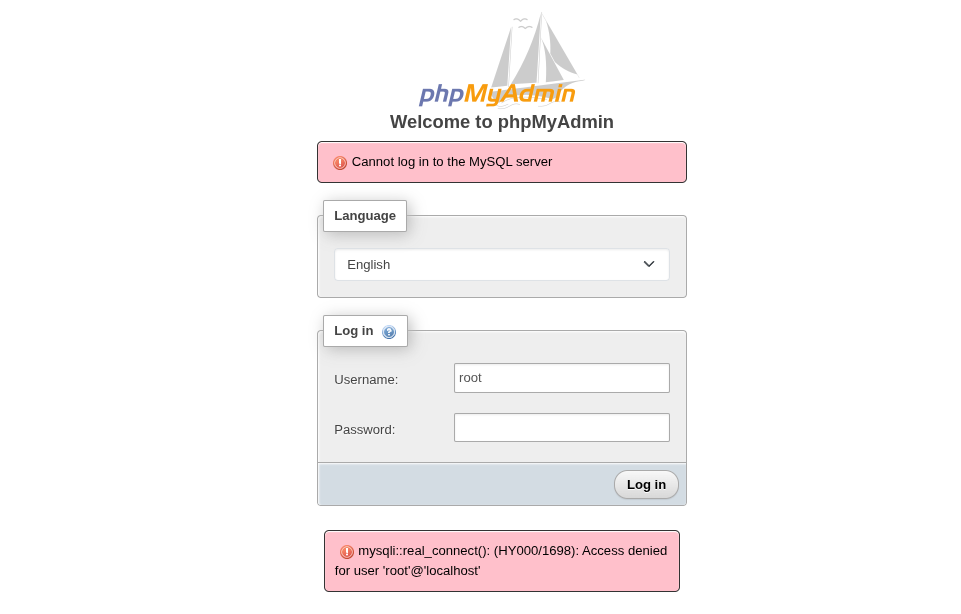
Nah, jika Anda mengalami masalah gagal login setelah fresh install HestiaCP, mungkin Anda bisa mencoba solusi sederhana berikut ini. Masalah ini muncul di Hestia Control Panel dengan distro Debian 12 (bookworm) dengan versi database server MariaDB 11.4+ dengan log kesalahan sebagai berikut:
Cannot log in to the MySQL server

mysqli::real_connect(): (HY000/1698): Access denied for user 'root'@'localhost'
Solusinya cukup sederhana dengan command berikut ini:
Prerequisites:
- VPS dengan OS Debian 11/12
- Hak Akses Root
- Familiar dengan Terminal Linux
1. Enable MariaDB Server
$ systemctl enable mariadb.service
2. Cek Password Root MariaDB di Root Folder
$ cat /root/.my.cnf
3. Amankan instalasi MariaDB server Anda dengan command berikut ini:
$ mariadb-secure-installation
NOTE: RUNNING ALL PARTS OF THIS SCRIPT IS RECOMMENDED FOR ALL MariaDB
SERVERS IN PRODUCTION USE! PLEASE READ EACH STEP CAREFULLY!

In order to log into MariaDB to secure it, we'll need the current
password for the root user. If you've just installed MariaDB, and
haven't set the root password yet, you should just press enter here.

Enter current password for root (enter for none):
OK, successfully used password, moving on...

Setting the root password or using the unix_socket ensures that nobody
can log into the MariaDB root user without the proper authorisation.

You already have your root account protected, so you can safely answer 'n'.

Switch to unix_socket authentication [Y/n] n
... skipping.

You already have your root account protected, so you can safely answer 'n'.

Change the root password? [Y/n] Y
New password:
Re-enter new password:
Password updated successfully!
Reloading privilege tables..
... Success!


By default, a MariaDB installation has an anonymous user, allowing anyone
to log into MariaDB without having to have a user account created for
them. This is intended only for testing, and to make the installation
go a bit smoother. You should remove them before moving into a
production environment.

Remove anonymous users? [Y/n] y
... Success!

Normally, root should only be allowed to connect from 'localhost'. This
ensures that someone cannot guess at the root password from the network.

Disallow root login remotely? [Y/n] y
... Success!

By default, MariaDB comes with a database named 'test' that anyone can
access. This is also intended only for testing, and should be removed
before moving into a production environment.

Remove test database and access to it? [Y/n] y
- Dropping test database...
... Success!
- Removing privileges on test database...
... Success!

Reloading the privilege tables will ensure that all changes made so far
will take effect immediately.

Reload privilege tables now? [Y/n] y
... Success!

Cleaning up...

All done! If you've completed all of the above steps, your MariaDB
installation should now be secure.

Thanks for using MariaDB!
root@srv:~#
Catatan: Saat diminta memasukkan password root, pastikan untuk memasukkan password root yang sama seperti di file /root/.my.cnf yang dihasilkan setelah fresh install HestiaCP.
4. Login kembali ke phpMyAdmin dan coba test apakah isue telah berhasil diatasi.